Stop Scrolling: A Template Built for Twitter Engagement
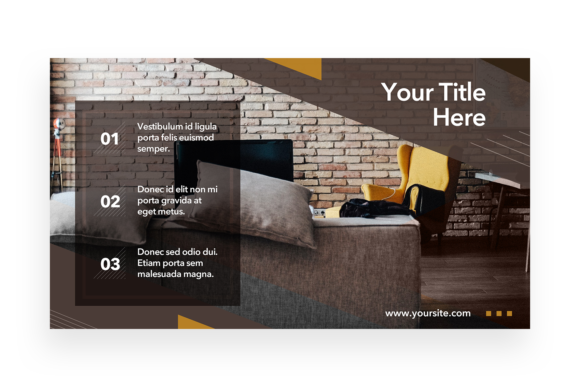
There is a specific kind of frustration that hits when you are trying to maintain a consistent brand presence on a platform as fast-paced as Twitter. You have the copy written, the hashtags ready, but you are staring at a blank canvas in Photoshop, struggling to align elements and wondering why your graphics never look quite as polished as your competitors. Enter the Multipurpose Template - Twitter Post. This isn't just another static design file; it is a robust system designed for creators who need speed without sacrificing quality. With dimensions of 2400×1350 pixels at a crisp 300dpi, this PSD file ensures your visuals remain sharp and professional, whether they are viewed on a high-resolution monitor or a mobile device.
Beyond the Basics: Why Smart Objects Change Everything
For the uninitiated, the term "Smart Object Replacement" might sound like technical jargon, but for anyone who has spent hours resizing images, it is a game-changer. In the context of this Multipurpose Template, Smart Objects allow you to swap out placeholder images with your own photography or artwork in seconds. You simply double-click the layer, paste your image, save, and the template automatically applies the correct perspective, shadows, and filters. This feature transforms the file from a simple PSD into a dynamic design asset that adapts to your specific needs. Whether you are a small business owner promoting a new product or a content creator sharing a recent blog post, this functionality saves you hours of production time.
Furthermore, the file is built for PSD CS4 or higher, ensuring compatibility with most modern setups. The layers are meticulously organized, meaning you won't find yourself digging through a chaotic folder structure to change a background color or edit a text block. This level of organization is crucial for professional presentation. When your workflow is streamlined, you have more mental energy to focus on the creative aspects of your marketing strategy rather than fighting with software tools.
Visual Consistency Across Your Brand Identity
One of the biggest hurdles in brand identity is maintaining a cohesive look. If your Twitter feed looks disjointed—random fonts, clashing colors, varying image qualities—it can subconsciously erode trust with your audience. By utilizing a structured template, you enforce a visual rhythm that your followers will come to recognize instantly. This Multipurpose Template serves as a foundation for that consistency. Because it is fully editable, you can customize the color palette to match your existing brand guidelines, swap fonts to match your premium font choices, and adjust layouts to suit different types of messaging.
Consider the versatility required in modern digital marketing. On Monday, you might be posting a quote graphic; by Wednesday, you are announcing a flash sale; and on Friday, you are sharing a carousel of tips. This template handles those shifting requirements while keeping the underlying visual language stable. It acts as a silent partner in your visual communication, ensuring that even when your content changes, your brand presence remains solid.
Practical Applications for Entrepreneurs and Creatives
While the primary function is clearly for social media, the utility of a high-resolution, easy to edit template extends far beyond the Twitter timeline. The 300dpi resolution makes it viable for more than just screen viewing; it bridges the gap between digital and print materials.
- Digital Products and Lead Magnets: If you are selling PDF guides or creating freebies for email sign-ups, the visual style of this template can be adapted to create consistent header images or section dividers within your documents.
- Website and Blog Graphics: High-quality visuals are essential for web design. You can use elements from this template to create hero images for your blog posts or banners for your homepage, ensuring your site looks as good as your social feed.
- Presentation Decks: For entrepreneurs pitching to investors or clients, having a polished slide deck is non-negotiable. The organized layers allow you to extract specific design elements to build out PowerPoint or Keynote slides that feel premium and custom-designed.
- Event Invitations and Merchandise: Whether you are hosting a webinar or designing a t-shirt mockup, the Smart Object capabilities allow you to place your designs onto different mockups easily.
This adaptability is what separates a standard download from a valuable design asset. It is not just about filling space on a Twitter feed; it is about building a visual ecosystem for your brand.
Technical Fidelity and Readability
In the realm of visual communication, details matter. A pixelated image or a blurry text overlay can make a brand look amateurish. The specification of 2400×1350 pixels at 300dpi is significant. While standard screen resolution is typically 72dpi, providing a file at 300dpi gives you a safety net. It means you have extra data to work with if you need to crop in tight on a specific element or repurpose the graphic for a printed flyer or poster.
Readability is another critical factor. A template is only as good as its ability to convey a message quickly. Twitter is a platform of skimmers; users scroll rapidly. The layout of this template is designed to guide the eye. It balances negative space with content areas, ensuring that your headline pops and your call to action is clear. When selecting your text to pair with this design, consider the hierarchy. Use a bold display font for headlines to grab attention, but switch to a clean sans serif font for body text to ensure legibility at smaller sizes.
Customization: Making the Template Your Own
Downloading the file is just the beginning. To truly leverage this Multipurpose Template, you need to approach customization with a strategy. Start by defining the mood you want to evoke. Are you going for a modern, minimalist vibe? You might strip back the layers and use a monochromatic color scheme with a sleek modern typography style. If your brand is more playful and organic, you might utilize the layers to add texture or swap in a script font for a handwritten font feel.
Don't be afraid to mix and match. The "Organised Layers" feature is your playground. You can toggle elements on and off to see how the composition changes. Sometimes, removing a decorative element creates a stronger, more impactful message. This iterative process of testing and tweaking is how you move from using a generic template to creating a bespoke piece of social media graphics that feels entirely unique to your brand.
Font Pairing and Licensing Considerations
The included "Read Me.txt" file is a vital part of this package, containing the link to the font used in the preview. While the preview image (which is included for reference only) shows the aesthetic, you need to ensure you have the rights to use the specific typeface in your final commercial work. Commercial licensing is a non-negotiable aspect of professional presentation. Ensure you visit the link provided and secure the appropriate license for the serif font or sans serif font featured in the design.
When it comes to font pairing, contrast is your friend. If the template's featured font is highly decorative or ornate, balance it with something simple and sturdy. For example, pairing a bold display font with a light weight sans-serif creates a visual hierarchy that is easy to scan. Avoid using two fonts that are too similar, as this can look like a mistake rather than a design choice. Take the time to test different combinations directly within the PSD file to see what resonates best with your audience.
Final Thoughts on Efficiency and Quality
In a competitive digital landscape, efficiency is currency. Spending hours wrestling with alignment and layout is time stolen from strategy, networking, or actual creation. This Multipurpose Template - Twitter Post offers a solution that balances high-end aesthetics with practical functionality. It empowers you to produce social media graphics, marketing assets, and editorial layouts that look like they were produced by a high-end agency, all while maintaining the agility of a solo creator or small team. By integrating this tool into your workflow, you are not just buying a file; you are investing in a smoother, more professional creative process.