Instant Dimension: Mastering the 3D Text Style Effect PSD
There is an immediate visual impact that comes with seeing text lift off the page, casting a shadow and catching the light. In a digital landscape crowded with flat, two-dimensional typography, a three-dimensional effect can stop a scrolling thumb in its tracks. This isn't just about visual flair; it's about creating a tangible, tactile presence for your words. For designers, marketers, and creators, achieving this professional depth used to require hours of meticulous layer manipulation, bevel and emboss settings, and lighting adjustments. Now, the entire process is distilled into a single, powerful asset: the Head - 3D Text Style Effect PSD. This resource is more than a preset; it's a gateway to instant, high-impact typography that communicates weight, importance, and sophistication.
Beyond Flat Design: The Visual Power of Added Depth
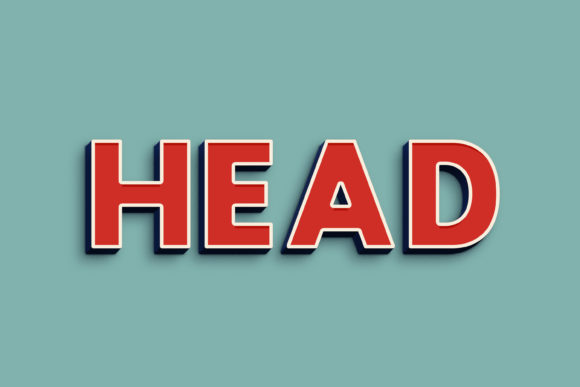
What makes this particular 3D text effect so compelling? It’s the marriage of simplicity and stunning results. The PSD file is engineered for a crisp, modern 3D look that feels both current and timeless. The shadowing is realistic, the extrusion is clean, and the overall effect avoids the dated, overly skeuomorphic styles that can make designs feel heavy. This makes it incredibly versatile. You can apply it to a bold sans-serif for a tech startup's logo, or to a classic serif font for the cover of a high-end editorial magazine. The 3000x2000 pixel canvas at 300dpi ensures that whether the final output is a massive poster or a high-resolution digital ad, the edges remain sharp and the details pristine. It’s a premium font effect that delivers professional results without a professional-grade time investment.
The true genius lies in its smart object architecture. The "Double-Click to Change" layer is your single point of control. This isn't just about swapping out letters; it's about transforming the entire asset. You can insert your own logo shapes, custom icons, or hand-lettered paths, and the 3D effect will automatically apply itself with perfect consistency. This feature alone makes it an indispensable tool for maintaining brand identity across countless assets. Imagine applying your unique brand wordmark in this 3D style to a social media template, a website header, and product packaging—all in minutes, all looking cohesively polished. The organized layers also mean that for those who want to dive deeper, individual elements like the shadow or the extrusion color can be tweaked to match exact brand guidelines.
Practical Applications: Where This Effect Shines
The utility of a robust text effect like this extends far beyond a single project. Its value multiplies across the spectrum of visual communication. For branding and logo design, it can create a memorable wordmark that stands out in a competitive market, especially for brands in gaming, entertainment, sports, or technology where a dynamic presence is key. In packaging design, a 3D headline on a box or label can suggest quality and substance, helping a product jump off the shelf. Think of a craft beer label, a gourmet coffee bag, or a sleek tech gadget box—the effect instantly conveys a premium feel.
For the digital realm, the applications are endless. Social media graphics benefit enormously from this depth. A 3D-styled call-to-action in an Instagram post or a key message in a Facebook ad graphic is more likely to stop the scroll and drive engagement. On websites and blogs, it can be used for hero section headlines, special announcement banners, or featured product titles, guiding the visitor's eye exactly where you want it. Content creators can use it for striking YouTube thumbnails, podcast cover art, or the title cards for online courses and digital products, instantly elevating the perceived value of their offering.
Print is not left behind. The high resolution makes it perfect for posters, flyers, and invitations. A music festival poster, a gala event invitation, or a retail sale flyer gains immediate visual hierarchy and excitement. Even editorial layouts in magazines or annual reports can use it sparingly for section headers to add a modern, design-forward touch. For merchandise like t-shirts, mugs, or stickers, a 3D text effect can make a simple phrase or graphic feel more like a collectible art piece. It’s a versatile design asset that solves a multitude of creative challenges.
Ensuring Cohesion and Clarity in Your Projects
While the effect is visually powerful, strategic application is what separates good design from great design. The first step is choosing the right base font within the smart object. A thick, geometric sans-serif will produce a strong, assertive 3D block. A delicate script font will create an intricate, elegant dimensional piece. Test a few options. The personality of the typeface should align with your project's goal—whether that's trustworthy, playful, luxurious, or urgent.
Readability remains paramount. A 3D effect, especially with strong shadows, can sometimes compromise legibility, particularly at smaller sizes. Always test your final design at the size it will be viewed. For body text or very small applications, this effect is likely too much. It’s designed for headlines, logos, and display text where impact is the primary goal. Pair it with a clean, simple sans-serif or serif font for supporting copy to create a balanced typographic hierarchy. The bold display font grabs attention, and the paired font delivers the detailed information comfortably.
Consider the context of your brand identity. If your brand is minimalist and clean, using this effect on every piece of collateral would be overwhelming. Instead, use it strategically for key campaign moments or hero products. If your brand is all about energy and spectacle, it could become a signature element. Review the included font styles and think about how they can be adapted. Perhaps the extrusion color is changed to a secondary brand color, or the shadow opacity is reduced for a more subtle effect. This kind of customization ensures the asset serves your brand, rather than dictating it.
Getting Started and Maximizing Your Investment
Using the Head - 3D Text Style Effect PSD is straightforward, but a few best practices will ensure success. After opening the PSD file, locate the clearly labeled smart object layer. Double-clicking it opens a new window—this is your editing canvas. Here, you can delete the placeholder text, type your own, or even paste in vector shapes from Illustrator. The key is to save and close this smart object window before saving your main PSD file. This non-destructive workflow means your original 3D effect remains untouched and reusable for future projects.
Always check the licensing terms outlined in the included Read Me.txt file. Most premium assets like this come with a commercial license, allowing you to use the final designs in client work, products for sale, and marketing materials. However, understanding the specifics—like whether you can redistribute the PSD file itself—is crucial for professional and legal peace of mind. This asset isn't just a one-time download; it's a long-term component of your design toolkit. By mastering this simple yet powerful 3D text effect PSD, you add a layer of professional polish and visual excitement that can genuinely elevate the communication and appeal of any project you undertake.