Acoroza: Your Go-To Template for Powerful Presentations
That familiar feeling of dread when tasked with creating a presentation from scratch is something many professionals know all too well. The pressure to convey complex data, tell a compelling brand story, and maintain audience engagement, all while ensuring a polished and professional look, can be paralyzing. You have the ideas, the strategy, and the content, but wrestling with slide layouts, color schemes, and graphic alignment often steals hours from your day. This is precisely where a well-crafted design asset transitions from a nice-to-have to a critical tool for efficiency and impact. A robust PowerPoint design template like Acoroza isn't just about pretty slides; it's about providing a structured, visually coherent framework that lets your ideas shine without the technical friction.
More Than Just Slides: A Visual Communication System
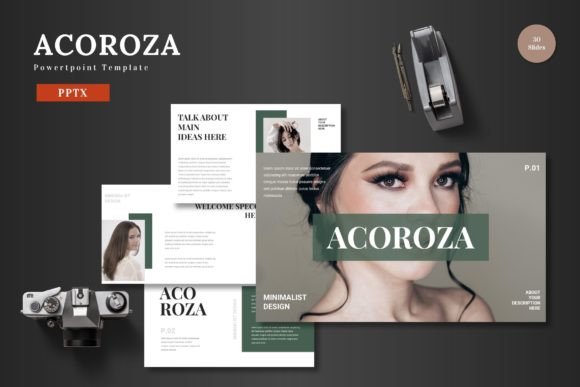
The Acoroza template distinguishes itself by functioning as a comprehensive visual communication system rather than a mere collection of slides. With over 150 total slides spread across five premade color variations, it offers a depth of options that caters to diverse presentation needs. Each of the five color schemes is thoughtfully curated to evoke different moods and professional tones, allowing you to align your presentation's aesthetic with your brand identity or the specific context of your talk. Whether you're presenting a quarterly financial review to stakeholders, pitching a new startup concept, or leading a creative workshop, having 30 meticulously designed slides per color theme provides a versatile starting point that can be adapted in minutes.
The foundation of this template is its Master Slides. This feature is a game-changer for maintaining visual consistency across your entire deck. By editing elements on the master slide, you can implement global changes—like updating a logo placement, adjusting a color accent, or modifying a footer style—in a single action. This ensures that every slide in your presentation adheres to a unified design language, which is fundamental for professional presentation and reinforcing brand recognition. The pixel-perfect illustrations and handcrafted infographics are not static images; they are fully resizable and editable vector graphics. This means you can scale them to fit any layout without losing quality, customize their colors to match your palette, and repurpose them across different projects, making them invaluable design assets.
Practical Applications for the Modern Professional
Understanding the features is one thing; envisioning their real-world application is where the value truly comes to life. For small business owners and entrepreneurs, the Acoroza template can streamline the creation of crucial marketing and operational materials. Imagine quickly generating a professional investor pitch deck using the data-driven slide layouts, or creating a visually engaging training manual for new hires using the gallery and portfolio slides to showcase products and processes. The picture placeholder and drag-and-drop functionality simplify the process of adding team photos, product images, or client testimonials, ensuring a polished look without advanced design skills.
Content creators and marketers can leverage this tool to develop cohesive visual narratives for social media campaigns, webinar presentations, or detailed blog post summaries. The section break slides are perfect for organizing content into clear, digestible chapters, guiding your audience through a logical flow. For those involved in branding and design, the template can serve as a starting point for developing brand guidelines presentations or client mood boards. The ability to easily switch between the five color schemes allows for rapid prototyping of different brand personality concepts, from sleek and corporate to vibrant and creative.
Even for personal projects, such as planning a wedding, organizing a community event, or preparing a lecture for a class, the structured layouts reduce the cognitive load of design, allowing you to focus entirely on your message. The included "Readme First" document is a thoughtful touch, providing clear information on the fonts and photos used, which is crucial for ensuring you have the correct licenses for commercial use and maintaining design integrity.
Integrating Acoroza into Your Workflow
Adopting a new template into your workflow requires a bit of strategy to maximize its potential. Begin by reviewing all 30 slides within your chosen color theme. Don't just skim; identify the slide types that are most relevant to your common projects—a data comparison slide, a quote slide, a team introduction slide, a timeline graphic. This initial audit will save you time in the future, as you'll know exactly where to find the layout you need.
When customizing, always start with the Master Slides. Set your company's primary and secondary brand colors, insert your logo, and establish your preferred font styles. This foundational step ensures that every new slide you create or modify will automatically inherit your brand's visual identity, guaranteeing visual consistency and saving you from repetitive adjustments. Use the editable infographics to tell data stories. Instead of pasting a static chart, you can manipulate the template's graphics to highlight key metrics, making your information more engaging and readable.
For those concerned with font pairing, the template likely includes a recommended typeface combination that works harmoniously with its design. Sticking to these recommended pairings—or carefully selecting alternatives with similar contrast and style—will preserve the template's professional aesthetic. Always test your final presentation on the device and software you'll be using, as colors and layouts can sometimes shift between different versions of PowerPoint or when displayed on various screens. This practical step ensures your audience engagement is focused on your content, not on unexpected technical glitches.
In essence, the Acoroza PowerPoint template is a facilitator. It handles the heavy lifting of visual design, providing a premium, modern typography