Duminic: A Modern Template for Polished Google Slides Presentations
You’ve spent hours crafting your message, refining your data, and perfecting your story. But when it comes to the final presentation, you open a blank Google Slides file and hit a wall. The default templates feel tired, and the idea of building a professional deck from scratch is daunting. What if you could skip the design headache and start with a foundation that’s already clean, versatile, and ready to impress? That’s the promise of the Duminic - Google Slide Template, a resource designed to bridge the gap between a great idea and a great-looking presentation.
More Than Just Slides: A Framework for Visual Communication
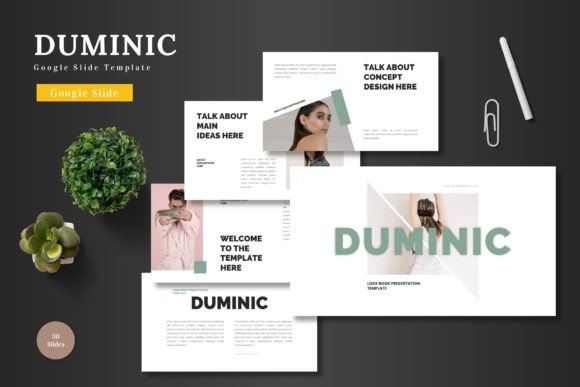
At its core, Duminic isn't just a collection of pre-made slides; it's a structured system for visual storytelling. The template is built on a philosophy of clarity and scalability, which means your content remains the star. The "clean, scalable, colorful and multipurpose" description isn't just marketing copy—it translates to real-world benefits. Whether you're a startup founder pitching to investors, a marketer launching a new product, or an educator sharing complex information, the template provides a consistent, professional backdrop that enhances your credibility.
The true value lies in its adaptability. With five premade color schemes and over 150 total slides, you have a toolkit at your disposal. This variety allows you to tailor the visual tone to your specific brand or topic without needing a degree in graphic design. A serious financial report might call for a muted, professional palette, while a creative agency pitch could leverage a bolder, more vibrant scheme. This flexibility makes it a practical asset for anyone who regularly communicates ideas visually, from freelancers to corporate teams.
Practical Applications for Business and Creative Projects
Let's move beyond the abstract and look at how a template like this integrates into your workflow. For small business owners, it’s about efficiency and polish. Instead of wrestling with alignment and formatting, you can drag and drop your product images into placeholders, input your market analysis, and change the accent color to match your logo—all within Google Slides. This means you can prepare for a client meeting or internal review in a fraction of the time, with a result that looks thoughtfully designed.
For content creators and marketers, consistency is key. Using the same visual framework for your webinar decks, social media strategy presentations, and quarterly reports helps build a recognizable brand identity. The handcrafted infographics and section break slides included in Duminic are particularly useful here. They allow you to present data, timelines, and key points in a visually engaging way that captures and holds your audience's attention, turning dry information into a compelling narrative.
Key Features That Streamline the Design Process
Understanding the features helps you leverage the template to its full potential. Here’s a breakdown of what makes it a practical tool:
- Master Slides Foundation: Every slide is based on master slides. This is a game-changer for maintaining visual consistency. Edit the master slide once, and the change cascades throughout your entire presentation, ensuring every font, color, and logo placement is uniform.
- Pixel-Perfect, Editable Graphics: The included illustrations and infographics are not just static images. They are fully resizable and editable vector graphics within Google Slides. This means you can adjust them to fit your data perfectly without losing quality.
- Intuitive Picture Placeholders: The drag-and-drop image placeholder system removes the friction from adding visuals. You don’t need to manually crop or resize every photo; the template guides the process for a clean, aligned look.
- Dedicated Portfolio & Gallery Slides: For designers, photographers, or any business showcasing work, these specialized slide layouts are invaluable. They present your projects in a structured, visually appealing grid that looks far more professional than a simple collage.
Choosing the Right Template for Your Goal
With so many slides and color options, it’s helpful to have a strategy. Start by defining the primary goal of your presentation. Is it to persuade, inform, or showcase? This will guide your slide selection.
For a pitch deck or business proposal, focus on slides that emphasize clear data visualization—bar graphs, pie charts, and comparison slides. Use the section breaks to clearly separate your problem statement, solution, market analysis, and financial projections. A consistent, professional color scheme will reinforce your seriousness.
For a product launch or marketing plan, leverage the gallery and portfolio slides to highlight product features and mockups. The animated slides can be particularly effective for drawing attention to key benefits or a call-to-action. A more dynamic color scheme might better suit the energy of a new launch.
For educational or workshop content, use the infographics to simplify complex processes or concepts. The clean layout reduces cognitive load, helping your audience focus on the content itself. Ensure your typography choices prioritize readability, especially for dense information.
Integrating Duminic into Your Broader Brand Toolkit
A presentation template should be one component of a cohesive visual identity. The colors and general aesthetic of Duminic can inform other areas of your branding. For instance, the color palette you choose for your presentation could be carried over to your social media graphics or website accents to create a unified look across platforms.
Think of it as a starting point for your visual language. The modern, clean typography and structured layouts provide a reliable baseline. You can then layer in your own brand elements—your specific logo, your brand’s photography style, your unique voice—to make it truly yours. This approach ensures that every touchpoint, from a slide deck to an Instagram post, feels connected and professional.
In the end, the goal of any design asset is to empower your communication, not complicate it. A well-structured template like Duminic - Google Slide Template provides the scaffolding so you can focus on what matters most: delivering your message with clarity and confidence. It’s about having a reliable, professional tool in your back pocket, ready to transform your ideas into presentations that resonate and achieve results.