Mastering Visual Harmony with the PASTEL Multipurpose Template
There’s a moment in every creative project where the vision in your head needs to meet the reality of a blank screen. Whether you’re pitching a new client, launching a product, or sharing a quarterly report, the visual framework you choose sets the tone before you speak a single word. A presentation isn’t just a collection of slides; it’s a visual argument for your idea. The challenge lies in finding a foundation that feels both polished and adaptable, one that supports your message without overwhelming it. This is where a thoughtfully crafted template becomes less of a shortcut and more of a strategic partner.
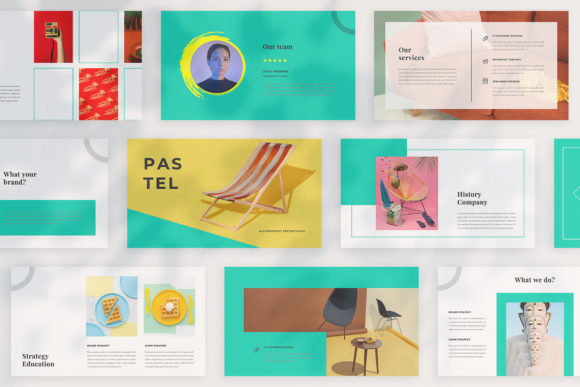
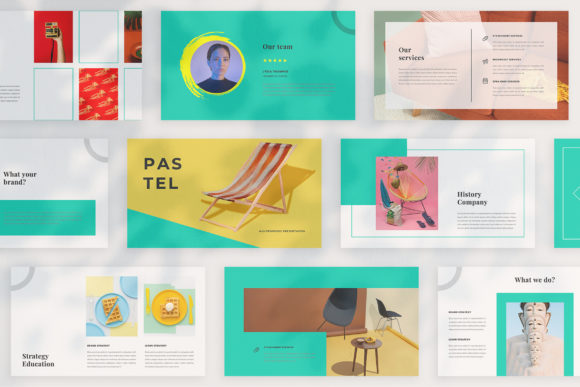
PASTEL - Google Slide Multipurpose is designed with this exact balance in mind. It’s not merely a set of pre-made slides but a cohesive visual system. Each slide layout is intentionally unique, moving beyond the repetitive, cookie-cutter designs that can make a presentation feel generic. This variety allows you to match the slide to the specific content—whether it’s a data-heavy chart, a powerful quote, a photo gallery, or a clean list of features. The concept is built around neat, modern aesthetics that provide a professional backdrop for any company, personal project, or client business. The goal is to offer a versatile tool that helps you present your ideas with clarity and visual appeal.
A Framework for Diverse Creative Needs
The true value of a multipurpose template like PASTEL lies in its application across different mediums. Think of it as a central hub for your visual branding. The consistent color theme and design language can be extended far beyond a slide deck. For a small business owner, this means the look and feel used in a client presentation can seamlessly translate into social media graphics, blog post headers, or even packaging mockups. A content creator might use the magazine-style layouts to plan the editorial flow of a digital lookbook or a course module. The automatic color change feature is particularly useful here, allowing you to instantly adapt the entire palette to match a brand’s existing guidelines without manually editing each element.
Practical uses are vast and varied. A marketing team can quickly assemble a campaign pitch deck that looks like it came from a design agency. An entrepreneur can create a cohesive set of materials for investor meetings, including leave-behind one-pagers and social media teasers. The high-resolution 1920x1080 pixel output ensures everything looks crisp, whether projected on a large screen or viewed on a laptop. The inclusion of a lookbook and magazine style layout opens doors for creative portfolios, product catalogs, or visual storytelling projects that require a more editorial approach.
Streamlining Your Workflow with Smart Design
Efficiency in design is about more than speed; it’s about reducing friction so your energy can focus on the message. PASTEL is built on Slidemaster, which means the core layouts are designed for easy customization. The “drag and drop your image” placeholder system is a game-changer for those who need to swap out visuals quickly. Instead of wrestling with cropping and alignment, you can drop in a photo from a site like Unsplash or Pexels, and it fits perfectly within the designed frame. This is invaluable for busy professionals who need to update presentations frequently with fresh content.
The template’s structure also encourages better design habits. The many variations of layout and text help prevent the common pitfall of text-heavy slides. By offering distinct sections for titles, subtitles, body copy, and visuals, it guides the user toward a more balanced and engaging composition. The free font used is a thoughtful touch, eliminating the need to hunt for and license typefaces separately. A link provided in the Help & Instruction PDF ensures you can access and install it easily, maintaining the intended look across all your projects.
Building a Cohesive Brand Identity
Visual consistency is the silent ambassador of your brand. When every touchpoint—from a slide deck to an Instagram story—shares the same design DNA, it builds recognition and trust. PASTEL provides a ready-made system for achieving this. Its unique theme color acts as a visual anchor. By sticking to the provided palette or using the automatic color change to set a new one, you ensure all materials derived from the template feel connected.
This is especially powerful for small businesses and solopreneurs who may not have a dedicated design team. The template becomes a brand asset library. The same style of imagery framing, the same typographic hierarchy, and the same spatial arrangements can inform your web design, your printed brochures, and your digital ads. This level of cohesion elevates a business’s perceived professionalism and helps the audience subconsciously recognize and recall the brand. It moves you from looking like you’re using a generic template to presenting a unified, polished identity.
Practical Advice for Maximizing Impact
To get the most out of a tool like PASTEL, a little strategy goes a long way. First, consider your project’s goal. Is it to inform, persuade, or inspire? Choose slide layouts that align with that intent. Use the magazine-style spreads for visual storytelling and the cleaner, more structured layouts for data or steps. Second, don’t feel constrained by the default colors. Use the automatic color change feature early on to align the template with your brand’s hex codes. This simple step transforms the template from a generic tool into a personalized brand system.
Third, be mindful of your imagery. The template is designed for high-quality photos. Use compelling, relevant images that enhance your narrative. Since the photographs in the preview are for illustration, source your own from reputable free sites to ensure you have the right to use them. Finally, remember that a template is a starting point. Customize it. Adjust the text boxes to fit your voice, and don’t be afraid to mix and match elements from different slide variations to create a flow that’s uniquely yours. The goal is to use the structure as a springboard for your own creativity, ensuring your final presentation is not just professional, but authentically yours.
In the end, a great presentation template does more than just organize information. It builds a visual stage where your ideas can perform. It provides the clarity, professionalism, and aesthetic appeal that help your audience focus on what truly matters: your message. With its blend of unique layouts, practical features, and adaptable design, PASTEL offers a robust foundation for anyone looking to communicate with visual confidence and consistency.