Alisha: A Modern Template for Dynamic Visual Storytelling
Creating a presentation that actually holds attention can feel like an uphill battle. You need something that looks polished and professional, but also feels fresh and engaging. Too often, templates offer a single, repetitive layout that you have to force your content into, resulting in a slideshow that feels monotonous before you even get to slide five. This is where a thoughtfully designed system can change the entire game for your next pitch, report, or creative portfolio review.
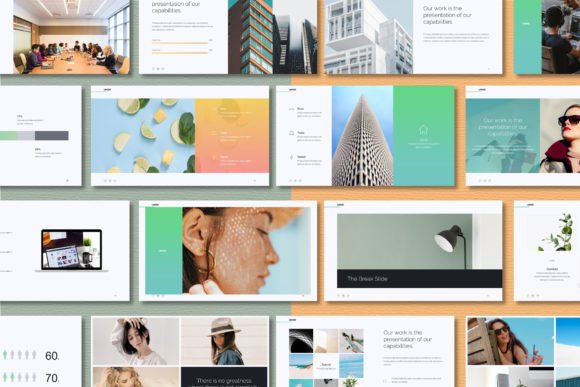
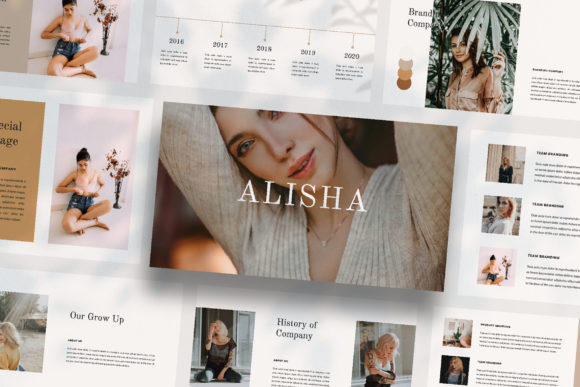
Imagine a tool where every slide tells a slightly different part of your story, with a layout that feels intentionally crafted for the content it holds. The Alisha - Powerpoint Template is built on this very principle. It’s not just a collection of slides with swapped-out color themes; it’s a cohesive visual language designed to guide your audience through your narrative with variety and clarity. Each layout is unique, offering a fresh perspective that keeps viewers engaged, making it an invaluable asset for anyone serious about visual communication.
More Than Slides: A System for Visual Consistency
At its core, Alisha functions as a complete design system. The "Unique Theme Colour" feature with automatic color change is a prime example. Instead of manually updating dozens of text boxes and shape fills, you can shift the entire palette of your presentation in seconds. This isn't just a convenience—it's a safeguard for brand consistency. Whether you're adapting a pitch deck for a new client or ensuring internal reports align with company guidelines, this feature ensures your visuals are always on-brand without the tedious labor.
The value extends far beyond the boardroom. Consider the needs of a freelance designer or a small marketing agency. You might use Alisha to create:
- Client Onboarding Decks: A visually striking, magazine-style lookbook to showcase your services and past work, setting a professional tone from the first meeting.
- Social Media Content Plans: Use the varied layouts to storyboard Instagram carousel posts or plan a series of visually cohesive LinkedIn graphics.
- Product Launch Guides: Detail the features, benefits, and marketing strategy for a new product using clean, editorial-style slides that are easy for a team to digest.
- Workshop or Course Materials: Transform educational content into engaging, visually-driven lessons that are far more effective than text-heavy slides.
The "Lookbook and Magazine Style Layout" is particularly powerful for creative professionals. It allows you to present work in a dynamic, portfolio-style format that feels more like a curated publication than a standard presentation. This approach is ideal for photographers, artists, interior designers, and anyone in a visual field who needs their work to speak for itself.
Practicality Meets Polish: The Design Details
A beautiful template is useless if it’s difficult to use. The practical design of Alisha is what makes it a reliable workhorse. Built with Slidemaster, the drag-and-drop image placeholder functionality is a significant time-saver. You don’t need to be a PowerPoint expert to achieve professional results. Simply click the placeholder, select your image, and it automatically crops and fits to the designated space. This removes the friction from the design process, allowing you to focus on your message and content.
Furthermore, the commitment to "Easy to Customize and Fully Editable" is critical. Every element—fonts, colors, shapes, and image containers—is unlocked and modifiable. This means you aren’t locked into the designer’s original vision. You can adapt it to your exact brand guidelines, tweak layouts to better suit your data, or combine elements from different slides to create entirely new compositions. The inclusion of a free font with clear licensing (linked in the Help & Instruction PDF) is a thoughtful touch, removing one more potential hurdle for commercial projects.
From Pitch to Portfolio: Real-World Applications
The true test of any design asset is its versatility across different projects. The Alisha template’s strength lies in its ability to morph to fit a wide array of professional and creative needs. Its clean, modern aesthetic acts as a neutral yet sophisticated canvas.
For entrepreneurs and startup founders, it’s the perfect tool for creating investor pitch decks that communicate credibility and vision. The varied layouts help structure the narrative—problem, solution, market, team—without visual fatigue. Marketing teams can leverage it for campaign post-mortems, quarterly reports, or strategic planning sessions, ensuring internal communications are as polished as external ones.
Content creators and bloggers will find it invaluable for designing media kits that impress potential sponsors. A well-designed media kit is a critical sales tool, and using a template with magazine-style elegance can significantly elevate your perceived value. Similarly, educators and coaches can use it to develop comprehensive course outlines or keynote speeches that are both informative and visually engaging.
Choosing Your Visual Voice
Selecting a template is about more than just aesthetics; it’s about choosing a visual voice that aligns with your project’s goals. The modern, clean typography and balanced layouts of Alisha convey professionalism, clarity, and contemporary taste. This makes it suitable for corporate environments, tech startups, creative agencies, and personal brands that want to project an image of competence and innovation.
When you integrate a tool like this into your workflow, you’re investing in efficiency and quality. It streamlines the design phase, ensures a high standard of visual output, and provides a flexible foundation that can grow with your projects. The result is not just a better-looking presentation, but a more confident delivery and a stronger connection with your audience. It’s about having a reliable, professional framework at your fingertips, ready to transform your ideas into compelling visual stories.