Designing a Polished Presentation: The Minimalist Approach
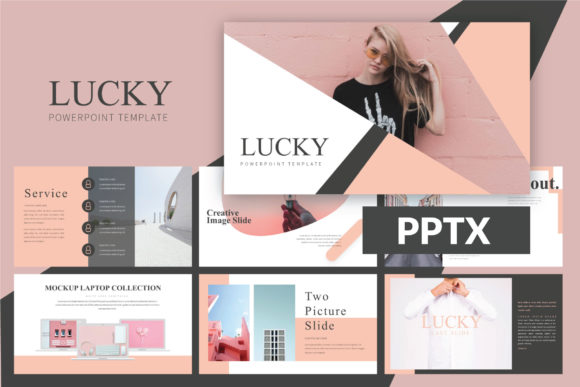
Every entrepreneur, designer, and content creator knows the sinking feeling of staring at a blank slide. You have the data, the product photos, and the strategy, but assembling them into a cohesive visual story often feels like a chore. Generic templates usually result in a cluttered, amateurish look that distracts from your message. If you are aiming for that sleek, high-end aesthetic found in modern fashion magazines or top-tier tech launches, the Lucky Powerpoint Template offers a distinct solution. It bridges the gap between a standard business pitch and a sophisticated visual experience, specifically tailored for those who value aesthetics as much as content.
Aesthetics That Speak Volumes
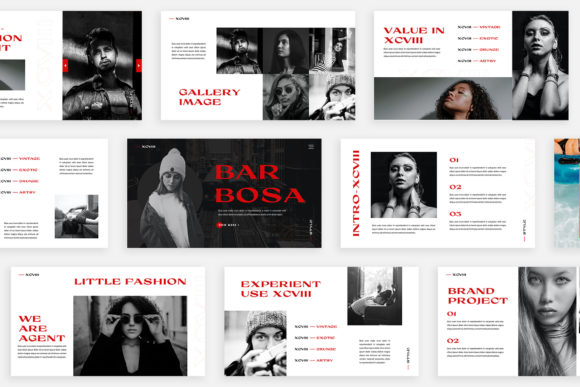
The first thing you notice about the Lucky Powerpoint Template is its refusal to be loud. In a market saturated with neon gradients and chaotic animations, this design embraces a minimal professional philosophy. It uses whitespace as a strategic asset rather than empty space to be filled. This approach allows your images to breathe and your typography to command attention. For anyone in the fashion industry, beauty sector, or creative agency, this is vital. A "girlboss" presenting a pitch deck or a "ladypreneur" showcasing a new lookbook needs a canvas that enhances the product without overpowering it. The ultra-modern layout ensures that even if you are presenting financial data or product specifications, it feels curated and editorial.
Design is often about psychology. When your slides look like they belong in a high-end catalogue, your audience subconsciously attributes that same value to your brand. The Lucky template achieves this through a unique design language that balances sharp lines with soft, inviting layouts. It is not just about placing text on a background; it is about creating an atmosphere.
From Digital Lookbook to Physical Packaging
While PowerPoint is traditionally associated with corporate meetings, this template expands the definition of what a slide deck can do. Because it features lookbook and magazine style layouts, it serves a dual purpose. You can use it for a live presentation, but you can also export it as a high-resolution PDF to serve as a digital catalogue or an editorial layout.
Imagine you are launching a new line of artisanal goods. You need packaging design concepts to show your manufacturer, but you also need social media graphics to tease the launch. The Lucky Powerpoint Template acts as a central hub for these marketing assets. By utilizing the device mockups included in the file, you can show clients or investors exactly how your website or app will look on an iPhone or a MacBook. This is invaluable for web design presentations or pitching a new digital product. It moves beyond simple logo design presentations into a full ecosystem of brand identity visualization.
The Power of Structure and Flexibility
A common pain point with premium font templates or complex slide decks is the rigidity of the design. You try to move one text box, and the whole slide falls apart. This is where the technical craftsmanship of this product shines. Built with Slidemaster, the template is designed for the "drag and drop" user. You do not need to be a PowerPoint wizard to make it look good. The structure is already there, waiting for your content.
Furthermore, the unique theme colour feature is a game-changer for visual consistency. If your brand uses a specific shade of terracotta or a deep navy blue, you do not need to manually change every shape and text box. The automatic color change functionality allows you to adapt the entire deck to your brand identity in seconds. This ensures that every marketing asset you produce maintains brand recognition, a crucial factor for small business owners trying to establish a foothold in a competitive market.
Practical Applications for the Modern Creator
The versatility of the Lucky Powerpoint Template extends to almost any visual project. It is not limited to corporate slideshows. Consider how this tool fits into your workflow for:
- Invitations and Editorial Layouts: Use the magazine-style grids to design digital invitations for a workshop or a gala. The modern typography pairs beautifully with high-fashion imagery.
- Merchandise Mockups: Before you print a run of t-shirts or tote bags, place your designs onto the included device mockups or blank layout spaces to create a portfolio.
- Print Materials and Posters: Because the resolution is High-res 1920x1080 Pixel (Full HD), the exported images are crisp enough for digital posters or simple print flyers.
- Blogs and Content Calendars: Content creators can use the clean layouts to map out their monthly content strategy visually, making it easier to share plans with a team or a virtual assistant.
Typography and Readability: The Details Matter
A slide deck is only as good as its readability. You can have the most beautiful background, but if the font is illegible, the message fails. The Lucky Powerpoint Template utilizes a free font strategy, providing links to the typefaces used within the included Help & Instruction PDF. This is a thoughtful touch that many designers appreciate. It removes the guesswork of trying to match a specific sans serif font or serif font seen in a preview image.
When customizing, pay attention to the hierarchy provided. The template likely uses a mix of weights to create visual interest. When you are replacing the placeholder text, stick to the established hierarchy. If a header is bold and a sub-header is light, maintain that contrast. This ensures your professional presentation remains easy to scan. Good typography is invisible when done right; it guides the eye without causing friction. Whether you are using a script font for accents or a clean display font for headlines, the layout is designed to handle the contrast gracefully.
Optimizing Your Workflow with Drag-and-Drop Design
Time is the most valuable resource for any entrepreneur. The inclusion of features like "Just Drag & Drop your Image" and the Icon Set cannot be overstated. Instead of spending hours aligning shapes, you can focus on the narrative. The many variations of layout mean you aren't seeing the same slide repeated 50 times. You get variety, which keeps your audience engaged.
For the creative entrepreneur, this means you can update your pitch deck for different clients without starting from scratch. For the hobbyist or crafter, it means you can create a professional-looking portfolio of your work without needing expensive software like InDesign or Illustrator. The PPT and PPTX file compatibility ensures that whether you are on an older version of PowerPoint or a newer one, or even using Google Slides, the file remains fully editable.
Final Thoughts on Execution
The Lucky Powerpoint Template is more than just a collection of slides; it is a framework for visual communication. It acknowledges that for many modern businesses, the line between a presentation and a marketing brochure is blurred. By providing a minimal professional canvas that is easy to customize, it empowers you to present your ideas with the confidence of a major agency. Whether you are pitching a new client, launching a product, or organizing your digital products, this tool provides the structure and style needed to make a lasting impression.