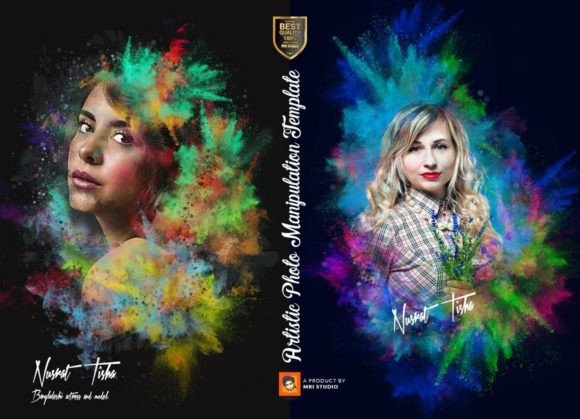
Transform Your Photos: Artistic Manipulation Templates
Ever scroll through social media and stop dead in your tracks because a photo looks like it belongs in a gallery or a high-end magazine? That stunning, painterly, or surreal quality isn't always the result of hours of manual editing in Photoshop. More often, creators are leveraging powerful Artistic Photo Manipulation Templates to achieve consistent, professional-grade results with remarkable efficiency. These aren't your basic filters; they are sophisticated design assets built on Smart Object technology, acting like a customizable action that automatically arranges, applies effects, and transforms your raw photos into cohesive artistic pieces.
Think of this template not as a rigid tool, but as a creative springboard. The core magic lies in its Smart Object Placement. You simply paste your photo into a designated layer, save, and the template's complex arrangements, artistic filters, color grading, paper textures, and stylistic effects are applied automatically. This "auto manipulation" process saves you from the technical grind, letting you focus on the creative vision. The result? An unlimited library of unique versions from a single starting point, because every photo you plug in yields a different outcome while maintaining a consistent artistic language.
Beyond Filters: The Anatomy of an Artistic Template
What sets a premium template like this apart from a simple app filter is its layered, editable structure. Delivered as organized PSD files for Adobe Photoshop (compatible from CS3 through CC), it provides full control. You're not stuck with a pre-baked look. Every element—the color overlay, the texture, the lighting effect, the distortion—is on its own layer, grouped logically. This means you can adjust the intensity of the artistic effect, change the color palette entirely, or swap out the background paper texture to match your project's exact needs. The 3000x4000 pixel resolution at 300 DPI ensures your creations are print-ready, perfect for posters, packaging, or large-format displays.
The practical value for a designer or entrepreneur is immense. Imagine creating a series of social media posts for a product launch. Instead of spending hours on each image, you use the template to generate a cohesive set of artistic renders in minutes. Each product photo gets the same treatment, reinforcing brand recognition through a unique visual style that competitors using standard filters simply can't match. The included help guide and free font links further streamline the process, making this a turnkey solution for high-volume content creation.
Practical Applications for Brand and Content
The versatility of an Artistic Photo Manipulation Template makes it a workhorse for numerous creative projects. Its strength is in establishing a strong, recognizable visual identity.
- Brand Identity & Logo Design: Use it to create textured backgrounds or artistic treatments for hero images on your website, making your brand feel more crafted and premium. The consistent effect becomes part of your brand's visual signature.
- Packaging & Merchandise: Generate unique artwork for product labels, boxes, or merchandise like tote bags and t-shirts. The artistic look can elevate a simple product into something that feels artisanal and desirable.
- Social Media & Digital Marketing: Stand out in crowded feeds. Transform ordinary product shots, blog post graphics, or event announcements into eye-catching pieces of art that drive engagement and shares.
- Editorial & Print Layouts: For magazines, blogs, or invitations, the template can produce striking feature images or decorative elements that give publications a professional, curated aesthetic.
- Invitations & Cards: Create one-of-a-kind invitations for weddings, parties, or corporate events that feel personal and artistically considered.
The key is to view the template as a starting point for your brand identity or creative font pairing. The artistic effect sets the mood, and your typography choices complete the story. A strong, modern serif font might complement a classic, textured manipulation, while a clean sans-serif could provide a contemporary contrast.
Maximizing Your Creative Workflow
To get the most out of this asset, approach it with a strategist's mindset. Before you start, define the goal of your project. Is it to evoke nostalgia? Convey modern luxury? Create whimsy? This will guide your customization.
- Test with a Batch: Don't just try one photo. Process 5-10 different images from your project to see how the template handles various subjects and lighting. This reveals its range and helps you set a standard for your series.
- Customize for Cohesion: While the "auto" effect is a huge time-saver, use the layered file to fine-tune. Adjust the color change layer to match your brand's hex codes. Swap the paper texture to align with your packaging material's feel. This customization is what separates generic use from strategic application.
- Consider the Final Output: The template's high resolution is a blessing for print, but for web, you'll need to optimize file sizes. Work on the full-resolution file for quality, then save optimized versions for your website or social media platforms.
- Pair Typography Thoughtfully: The artistic look is half the battle. The right font pairing is the other half. If the manipulation is busy and textured, pair it with a simpler, highly readable typeface. Use the included font recommendations as a starting point for experimentation.
Ultimately, this Artistic Photo Manipulation Template is less about a single effect and more about unlocking a scalable creative process. It empowers you to produce a high volume of unique, visually consistent content that strengthens your brand's visual language and captures audience attention, all without requiring advanced Photoshop expertise. It’s a practical tool for the modern creator who values both artistry and efficiency.