Streamline Your App Design with a Versatile Mobile UI KIT
Building a mobile application from the ground up is a monumental task, especially when it comes to the user interface. The sheer number of screens, buttons, icons, and layouts can quickly become overwhelming, consuming valuable time and resources before a single line of code is even written. This is where a well-crafted Mobile UI KIT becomes an indispensable asset. It provides a foundational library of pre-designed, pixel-perfect components that allow you to assemble a professional and cohesive app interface with remarkable efficiency. Instead of starting from a blank canvas, you begin with a robust framework that you can customize, adapt, and make entirely your own.
What Exactly is This Mobile UI KIT?
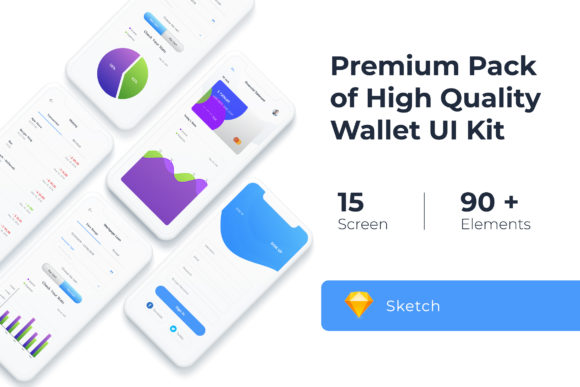
Think of this particular Mobile UI KIT – specifically tailored for a Wallet App – as a comprehensive toolkit for digital builders. It consists of 20 high-quality, fully editable templates that serve as the building blocks for your application. The collection is not just a random assortment of screens; it’s a thoughtfully curated set designed to guide the user through a logical flow, from onboarding and login to dashboards, transaction histories, and profile settings. Each screen is crafted with modern design principles in mind, ensuring a clean, intuitive, and visually appealing user experience right out of the box.
The true power of this kit lies in its flexibility. It’s built for designers, entrepreneurs, and developers who need to move quickly without sacrificing quality. The assets are delivered in formats that integrate seamlessly into popular design workflows, including Adobe XD, Adobe Photoshop, and Sketch. This means you can open the files, inspect the layers, and begin modifying elements immediately. The 100% vector-based graphics ensure that every icon, button, and shape remains crisp and scalable, whether you’re designing for a standard smartphone or a high-resolution tablet.
From Template to Tailored Application: Practical Customization
A common misconception is that using a template results in a generic-looking product. This couldn't be further from the truth. A high-quality UI kit is a starting point, not a final product. Its value is realized in how you customize it to reflect your unique brand identity and meet the specific needs of your users. The "fully editable" nature of this kit is its most critical feature. You have complete control to add, subtract, or reconfigure any element on the screen.
For instance, if you're designing a fintech app but the default color scheme doesn't align with your brand's palette, you can easily change the color style across all elements with a few clicks, thanks to the organized symbol objects and vector layers. Need a different set of icons to better represent your services? The included free icon vector pack can be swapped out or supplemented with your own. You might decide that a particular screen needs an additional input field or that a button should be more prominent. With a fully layered file, these adjustments are straightforward, allowing you to tailor the user journey precisely to your application's logic.
This process transforms the kit from a static template into a dynamic design system for your project. It helps maintain visual consistency across dozens of screens, which is fundamental to building a professional app that users trust. A consistent design language—where buttons behave the same way, typography is uniform, and spacing is predictable—reduces the learning curve for users and makes the entire experience feel polished and intentional.
Building a Cohesive Brand Beyond the App Interface
The utility of a versatile Mobile UI KIT extends far beyond the application itself. The design elements, aesthetic principles, and component styles can serve as the foundation for a broader brand identity system. This is particularly valuable for startups and small businesses looking to establish a strong visual presence from day one.
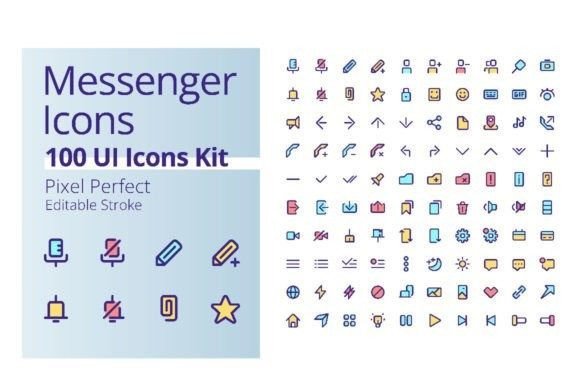
Consider the typography and iconography within the kit. These choices can inform your logo design, ensuring it feels harmonious with your app's interface. The clean, modern aesthetic can be translated directly to your website design, creating a seamless transition for users moving between your site and your mobile app. Social media graphics can adopt the same color schemes, button styles, and layout principles, reinforcing brand recognition across every platform where your audience encounters you.
Even for projects that aren't app-centric, the design assets have a place. The high-quality UI elements are perfect for creating professional marketing materials, presentation decks, or digital product mockups. A content creator could use the kit to design sleek graphics for a blog or YouTube channel. An entrepreneur might adapt the clean layouts for a digital brochure or an online course interface. The principles of good UI design—clarity, hierarchy, and ease of use—are universal and can elevate any visual communication.
Choosing and Implementing Your Design Assets Wisely
When selecting any design asset, including a Mobile UI KIT, a thoughtful approach ensures you get the most value. First, assess the kit's style. Does it lean towards a minimalist, corporate look, or is it more playful and vibrant? The Wallet App kit featured here presents a modern, clean aesthetic that suits a wide range of professional applications, from finance to productivity tools. Ensure the visual personality aligns with the tone you want to set for your brand.
Next, consider the practical workflow. The fact that this kit includes 80+ UI elements and is built with symbol objects and scalable vectors is a significant time-saver. Symbols allow you to create reusable components; update the master symbol, and every instance across your project updates automatically. This is crucial for maintaining consistency and making last-minute changes efficiently. Always check the licensing of included assets, like the free fonts, to confirm they are cleared for your intended commercial use.
Finally, think about your audience. The best designs are those that feel intuitive to the end-user. While customizing, prioritize readability and clear visual hierarchy. Test your font pairings—ensuring a clear distinction between headings and body text—and make sure interactive elements like buttons are easily recognizable and accessible. A well-structured UI kit guides you toward these best practices, but it's always wise to gather feedback and test your designs with real users whenever possible.
By leveraging a comprehensive Mobile UI KIT, you’re not just saving time on initial design. You’re adopting a systematic approach to building digital products that are visually consistent, professionally polished, and ready to engage your target audience from the very first tap. It’s a strategic investment in the quality and scalability of your digital presence.