Noorale: A Dynamic PowerPoint Template for Modern Presentations
Creating a presentation that captivates an audience while maintaining a professional aesthetic is a challenge many professionals face. Whether you're pitching a new business idea, showcasing a product line, or presenting quarterly results, the visual foundation of your slides plays a critical role in how your message is received. A cluttered, inconsistent, or dated template can distract from even the most compelling content. This is where a well-crafted, versatile template becomes an invaluable asset, saving hours of design time and ensuring a polished, cohesive look from the first slide to the last.
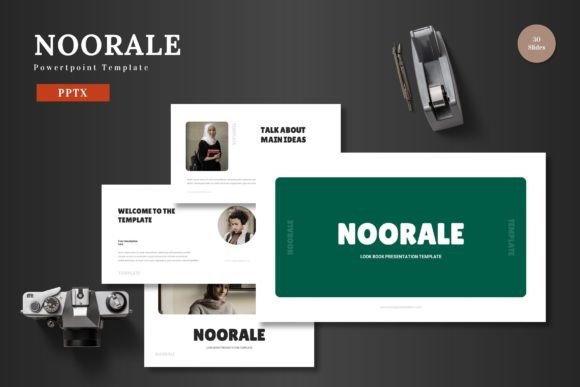
The Noorale - Powerpoint Template is designed to address these needs directly. It’s not just a collection of slides; it’s a comprehensive design system built for clarity and impact. With over 150 total slides organized across five premade color schemes, it offers a robust starting point for a wide range of projects. The structure is intuitive, featuring dedicated section breaks and a logical flow that guides the presenter through their narrative. Each slide is crafted with pixel-perfect illustrations and clean, scalable graphics, ensuring that every element looks sharp, whether projected on a large screen or viewed on a laptop.
Practical Applications for Every Professional
One of the strongest aspects of this template is its adaptability. It’s labeled as multipurpose for good reason. For entrepreneurs and startup founders, it’s ideal for crafting a compelling pitch deck that communicates value propositions and financial projections with clarity. The clean layout helps keep the focus on key data points and strategic messages. Small business owners can leverage it for internal reports, team meetings, or client-facing proposals, reinforcing a consistent and professional brand identity through every touchpoint.
For marketers and content creators, the template serves as a powerful tool for social media graphics and digital products. The ability to easily edit every element—change colors to match a brand palette, swap placeholder images with product shots, and adjust text—means you can create a series of branded presentation assets for webinars, online courses, or Instagram story tutorials. The inclusion of gallery and portfolio slides is particularly useful for designers, photographers, or crafters looking to showcase their work in a structured, visually appealing format. Imagine presenting a collection of handmade goods or a design portfolio; the template provides the framework to let the work itself shine.
Designed for Ease and Efficiency
A common frustration with many templates is the complexity of editing. The Noorale - Powerpoint Template is built with the end-user in mind, emphasizing ease of use directly within PowerPoint. There’s no need for additional software like Adobe Illustrator or Photoshop to make changes. Every graphic is a resizable and editable PowerPoint shape, and all slides are based on master slides. This means you can make a change to a color scheme or font style on the master slide, and it will automatically update throughout the entire presentation. This feature is a massive time-saver and ensures visual consistency, which is crucial for building brand recognition.
The drag-and-drop picture placeholder functionality streamlines the process of adding your own imagery. Instead of manually cropping and positioning photos, you simply drag your image into the placeholder, and it automatically scales to fit the designated area. This practical design choice allows you to focus more on your content and story rather than on tedious formatting. The template includes animated slides as well, adding a layer of professional polish that can help maintain audience engagement without being distracting.
Enhancing Your Brand's Visual Communication
Consistent use of typography and color is a cornerstone of effective branding. The Noorale template comes with five distinct color variations, allowing you to select a scheme that best aligns with your existing brand guidelines or the mood of your presentation. Whether you need a bold, energetic palette for a product launch or a subdued, professional scheme for a financial review, the options are there. This flexibility helps in creating presentations that feel tailored and intentional, rather than generic.
While the template itself is not a font, its clean, modern aesthetic is designed to work harmoniously with a wide range of typefaces. When customizing, consider how your chosen fonts complement the template’s modern typography foundation. For headings, a strong display font or a clean sans serif font can command attention. For body text, prioritize readability with a well-spaced serif or sans-serif font. The goal is to create a hierarchy that guides the viewer’s eye naturally from titles to key points and supporting details. A thoughtful font pairing can elevate the entire presentation, making it feel more cohesive and professionally designed.
Maximizing the Template's Potential
To get the most out of this resource, start by planning your presentation’s structure before diving into design. Use the provided section break slides to organize your content logically. Take advantage of the handcrafted infographics to present data, timelines, or processes in a visually engaging way—infographics are far more effective at conveying complex information quickly than dense paragraphs of text.
Remember, all elements are editable. Don’t feel constrained by the initial layout. Use the scalable graphics to create custom icons or illustrations that are unique to your brand. Combine slides from different color schemes if it serves your narrative. The template is a toolkit, not a rigid mold. Before finalizing your presentation, always test it in the actual setting where it will be viewed. Check for readability from the back of a room, ensure animations run smoothly, and verify that color contrasts are clear in different lighting conditions.
Ultimately, the Noorale - Powerpoint Template is more than just a set of pre-designed slides. It’s a practical solution for anyone who needs to communicate ideas visually with professionalism and flair. It bridges the gap between having a great idea and presenting it in a way that resonates, engages, and leaves a lasting impression. For the business owner, the marketer, the educator, or the creative, it provides the visual foundation to tell your story effectively and confidently. Cheers to creating presentations that truly connect.