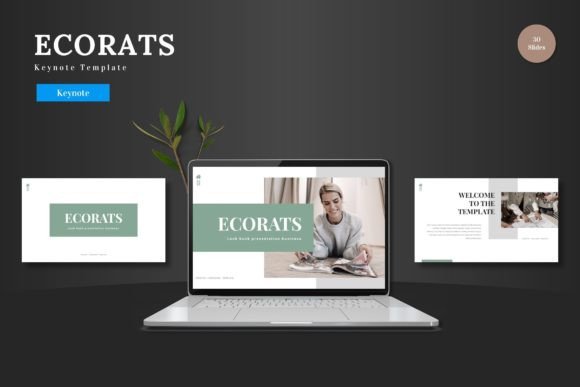
Ecorats: The Keynote Template That Simplifies Professional Design
There’s a particular kind of frustration that hits when you open a blank presentation file. You have a clear message, a tight deadline, and a vision for something polished, but the default tools feel limiting. You start with a title slide, maybe add a text box, and suddenly an hour has passed with little to show for it. The gap between a rough idea and a professional, cohesive deck often feels enormous. This is precisely where a thoughtfully built resource like the Ecorats - Keynote Template changes the game. It’s not just a collection of slides; it’s a structured starting point designed to bridge that gap efficiently, allowing you to focus on your content rather than wrestling with formatting.
A Foundation for Visual Consistency and Brand Identity
For anyone building a brand—whether you’re a solopreneur, a startup, or a marketing team—visual consistency is non-negotiable. Every touchpoint, from your website to your social media graphics to a client pitch deck, should feel like it comes from the same source. This is where a comprehensive template like Ecorats proves its worth. With 150+ total slides organized across five premade color schemes, it provides a robust system rather than a one-off design. You’re not just getting a set of layouts; you’re getting a repeatable framework. The five color variations allow you to align the template directly with your established brand palette from day one, ensuring that every presentation reinforces your identity. This kind of consistency builds recognition and trust with your audience, whether they’re investors, customers, or partners.
The true power lies in the editable nature of every element. Because all graphics are resizable and editable directly within Keynote, you’re not locked into a rigid design. Need to adjust a chart to match your quarterly data? Simple. Want to swap out an icon to better represent your service? Straightforward. The pixel-perfect illustrations and handcrafted infographics are built as native Keynote shapes, meaning they scale cleanly and can be customized to your heart’s content. This level of control is crucial for maintaining a professional presentation that feels uniquely yours, not like a generic template everyone else might be using. It’s the difference between presenting a pre-made slide and presenting your brand’s story.
Practical Applications Beyond the Boardroom
While the primary use case is clear—business presentations, pitch decks, and product promotions—the versatility of a well-designed slide template extends further than you might initially think. Consider the needs of a content creator or a blogger. A clean, scalable template is perfect for designing visual summaries of blog posts for platforms like Pinterest or Instagram. The gallery and portfolio slides become instant assets for showcasing work, whether you’re a photographer, a graphic designer, or a crafter selling handmade goods. The drag-and-drop picture placeholders streamline this process dramatically, turning what could be a tedious task into a quick and enjoyable one.
For small business owners, the applications are equally practical. Use the template to create professional-looking product catalogs for e-commerce, design informative one-pagers for trade shows, or develop internal training materials for your team. The multipurpose nature of the slides means you can adapt a data-heavy infographic slide into a compelling visual for a social media campaign, or transform a clean portfolio layout into an elegant invitation for a workshop or event. The goal is to leverage the design asset for multiple needs, maximizing your return on time and investment. It’s about having a reliable toolkit that supports various facets of your business communication.
Design Intelligence Embedded in the Details
What separates a good template from a great one often comes down to the thoughtful details that support real-world use. The inclusion of section break slides, for instance, is a subtle but powerful feature. They help structure your narrative, giving your audience a mental pause and making your presentation easier to follow. This is a key consideration for readability and audience engagement, especially during longer pitches or educational talks. Furthermore, the template’s foundation on Master Slides is a hallmark of professional design practice. It ensures that global changes to fonts, colors, or styles can be applied uniformly across all 30+ slides in a single template with just a few clicks, saving immense time and preventing inconsistencies.
The package also acknowledges the practical side of design work. The “Readme First” file with font and photo information is a critical, often overlooked, component. It provides clarity on licensing and sourcing, helping you avoid legal pitfalls when using the template for commercial projects. This attention to the user’s full workflow—from initial edit to final public presentation—demonstrates a deep understanding of what designers and entrepreneurs actually need. It’s not just about making slides look good; it’s about making the entire process of creating and sharing them as smooth as possible. When you’re ready to present your slides to the world, having that peace of mind is invaluable.
Choosing Your Path: From Template to Polished Asset
Getting started is intentionally straightforward. The main files include five PPTX files (in widescreen format) corresponding to the five color schemes, giving you an immediate visual starting point. The first step is to choose the color scheme that best aligns with your project’s mood or your brand’s existing colors. From there, the process is iterative and creative. Begin by inputting your core content—your key messages, data points, and calls to action. Then, leverage the picture placeholders to drag and drop your own imagery, instantly personalizing the deck. Finally, use the editable shapes and infographics to visualize your data in a way that’s both clear and visually engaging.
Remember that a template is a starting point, not the final product. Don’t be afraid to adjust layouts, combine elements from different slides, or modify the provided graphics to better tell your story. The strength of the Ecorats - Keynote Template is that it gives you a professional, scalable canvas to work from. It eliminates the blank-page anxiety and the technical hurdles of building a complex deck from scratch. By handling the structural and aesthetic heavy lifting, it frees you up to concentrate on what truly matters: crafting a compelling message that resonates with your audience. Whether you’re pitching a new idea, promoting a product, or sharing knowledge, having a reliable, high-quality visual foundation makes all the difference.