Designing Impactful Visuals for International Women's Day
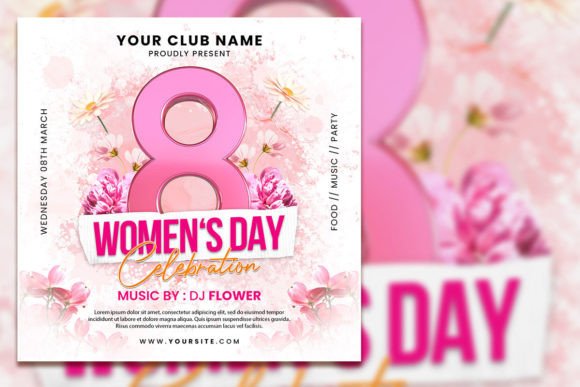
Creating a visually compelling message for International Women’s Day requires more than just a beautiful image; it demands a tool that is both powerful and adaptable. A well-designed International Women’s Day Square Flyer serves as the perfect foundation for your campaign, offering a professional canvas that you can customize to fit your unique vision. This template is not just a static file; it’s a fully editable asset designed for Adobe Photoshop, empowering designers, marketers, and small business owners to produce high-quality promotional materials without starting from scratch. With a perfect square format and high resolution, it’s optimized for both digital and print applications, ensuring your message of empowerment and celebration looks crisp and engaging across all platforms.
The Anatomy of a Versatile Design Asset
What makes this particular International Women’s Day Square Flyer template stand out is its thoughtful construction. At 2000 x 2000 pixels with a 300 dpi resolution and RGB color mode, it meets professional standards for vibrant, clear output. The organized layers within the PSD file are a significant time-saver. Instead of wrestling with a cluttered document, you can easily isolate elements—whether it’s the background, text blocks, or graphic accents—to apply your changes. This level of organization is crucial for maintaining visual consistency when you need to produce multiple versions of a flyer for different social media channels or print sizes. The template acts as a reliable starting point, freeing you to focus on the creative and strategic aspects of your campaign rather than the technical setup.
From Template to Tangible Branding
The true value of a premium design asset lies in its application. This editable PSD template is a versatile component for your broader brand identity system. Consider these practical uses where a cohesive visual style is paramount:
- Social Media Graphics: The square format is inherently suited for platforms like Instagram and Facebook. Use the template to create a series of posts that tell a story, promote an event, or highlight inspirational quotes, all while maintaining a unified aesthetic.
- Print Materials & Posters: The high-resolution file ensures your message translates beautifully to physical materials. Print posters for community boards, create handouts for events, or design postcards to mail to clients and partners.
- Digital Marketing Assets: Beyond social media, adapt the flyer for email newsletters, website banners, or digital event invitations. The consistent use of color and typography strengthens your brand recognition with every touchpoint.
- Event Invitations & Promotions: Whether you’re hosting a webinar, a local gathering, or a virtual summit, a customized invitation sets the professional tone. Edit the text to include event details, RSVP links, and your unique branding.
By integrating this template into your workflow, you create a seamless visual experience for your audience. They’ll begin to associate the polished, intentional design with your brand’s commitment to quality and the values you represent on this important day.
Strategic Typography: More Than Just Changing Text
The instruction to “select text with text tool and replace your text” opens a door to sophisticated typographic design. The fonts included in the template are a starting point, but your choices in this area significantly impact readability and emotional resonance. When editing the PSD file, consider the following:
- Font Pairing: Does the existing pairing of a serif and sans-serif font work for your brand? A serif font can convey tradition and authority, while a sans-serif often feels modern and clean. For a script or handwritten font, use it sparingly for accents or headlines to maintain legibility.
- Hierarchy & Readability: Ensure your main message (e.g., “Celebrate International Women’s Day”) is the most prominent. Use size, weight, and color to create a clear hierarchy. Check that all text is easily readable against the background, especially for smaller details like dates and locations.
- Brand Consistency: If your brand has established typefaces, consider swapping the template’s fonts for your own. This simple change can make the flyer feel uniquely yours and seamlessly integrated with your other marketing materials, from your website to your packaging design.
Thoughtful typography transforms a generic template into a powerful piece of editorial design that speaks directly to your audience.
Customization That Tells Your Story
The directive to replace the photo with your own is perhaps the most powerful customization feature. A stock image is a placeholder; your chosen image is a story. Whether you use a professional portrait of your team, a photo from a past community event, or an artistic image that symbolizes strength and unity, this personal touch makes the flyer authentic.
When selecting your image, think about composition and how it interacts with the text layers. The template’s organized layers should make it straightforward to adjust the placement or even apply filters to ensure your photo harmonizes with the overall color scheme. This process of customization is where you infuse the design with your brand’s personality, turning a standard International Women’s Day Celebration Editable PSD Template into a genuine reflection of your organization’s spirit and mission.
Practical Workflow for a Polished Result
To get the most out of this Photoshop Template - Instant Download, a structured approach helps. Begin by saving a copy of the original PSD file to preserve the source. Then, work methodically:
- Background & Imagery: Start by placing your custom photo. Adjust its size and position. Then, explore the background layers—can you change the color or texture to better match your photo?
- Text & Messaging: Move to the text layers. Update all necessary information: event name, date, time, venue, website, and call to action. Experiment with the font styles provided or introduce your brand’s typefaces.
- Color & Graphics: Fine-tune the color palette. While the template has a default scheme, you can often adjust accent colors to align with your brand identity. Review any graphic elements or borders for consistency.
- Export & Review: Once edited, export the file in the required formats—perhaps a high-quality JPEG for social media and a PDF for print. Always review the final output at 100% zoom to check for alignment issues or typographic errors.
This practical workflow ensures your final product is professional, cohesive, and ready to make an impact. The right design asset, combined with intentional customization, allows you to communicate your message with clarity and visual appeal, honoring the spirit of the day while advancing your own creative or commercial goals.