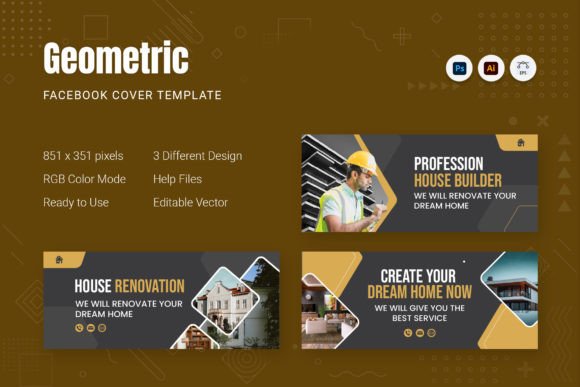
Geometric Facebook Cover: Modern Templates for a Polished Profile
That moment when you land on a Facebook page and it just looks… professional. The cover image is crisp, the layout is intentional, and the whole vibe screams "we've got our act together." You wonder how they pulled it off, especially if you're not a seasoned designer with hours to spare. The secret often lies in starting with a smart, adaptable template—like a geometric Facebook cover design. These templates leverage clean lines, modern shapes, and structured layouts to give your social presence an instant upgrade, making expert-level graphics achievable for anyone willing to put in a few minutes of work.
Beyond Basic: The Visual Power of Geometric Design
What makes a geometric approach so effective for a Facebook cover? It's all about visual harmony and contemporary appeal. Geometric patterns and layouts bring order to the chaotic space of a social media header. They create clear focal points, guide the viewer's eye logically across the 851x315 pixel canvas, and offer a sophisticated backdrop for your core message. Unlike overly busy or random imagery, a geometric foundation feels intentional and design-forward. It communicates a sense of clarity, innovation, and professionalism without saying a word. This style works exceptionally well for brands in tech, consulting, creative services, e-commerce, and any field where a modern, trustworthy image is paramount.
Real-World Applications for Your Brand
Let's move beyond theory. How can you actually use a geometric Facebook cover template to serve your goals? The applications are surprisingly versatile.
- Consistent Branding: Use the template's structure to showcase your logo, tagline, and brand colors in a cohesive layout. The geometric elements can be subtly colored to match your palette, reinforcing visual identity every time someone visits your page.
- Product Launches & Promotions: Need to announce a sale, a new service, or an upcoming event? The organized sections of a geometric cover are perfect for layering text and imagery. Place a striking product shot in a main shape and use adjacent areas for key details or a call-to-action.
- Portfolio & Service Showcase: For freelancers, agencies, or artists, the cover is prime real estate. Use different geometric panels to feature samples of your work, client logos, or icons representing your core services. It's a dynamic, visual resume header.
- Community Building: If you're a content creator, blogger, or community leader, use the space to highlight your latest content, a member spotlight, or a recurring theme. The clean format keeps it from feeling cluttered, even with multiple pieces of information.
The true value here is the bridge it creates between amateur effort and professional presentation. You're not just slapping a photo and some text together; you're using a pre-designed system that ensures alignment, spacing, and visual hierarchy are all handled. This saves you from the common pitfalls of awkward text placement or overwhelming visuals that can make a page look unpolished.
Unlocking the Template: How It Actually Works
The real magic of a quality template package is its editability. You're not buying a static image. You're investing in a design asset that's built for customization. Typically, you'll receive files compatible with industry-standard software like Adobe Photoshop and Illustrator. This means you have full control.
In Photoshop, the process is often incredibly straightforward. Templates are usually organized with clearly labeled layers. Want to insert your own photo? You'll likely find a layer named "Replace" or "Your Image Here." Double-clicking that layer opens a Smart Object where you can paste your image, save, and watch it automatically conform to the geometric mask in the main file. Need to change the color of a shape? Simply select that layer and adjust the fill. The text layers are equally editable, allowing you to swap in your own headlines and descriptions with your chosen brand fonts.
Illustrator files offer similar flexibility with vector elements. You can scale shapes without losing quality, change stroke weights, and recolor everything with precision. The inclusion of EPS files also means broad compatibility with other design software. The key takeaway is that you're starting with a professionally crafted layout, not a blank page. Your job shifts from "layout architect" to "content curator," which is a much faster and less daunting task.
Maximizing Impact: Practical Tips for Customization
To get the most out of your geometric Facebook cover, think strategically about the elements you're placing within it.
- Prioritize Your Message: Decide on the single most important thing you want a visitor to know. Is it your brand name? A current promotion? Your core service? Place that element in the most prominent geometric shape, often the largest or centrally located one.
- Embrace White Space: Geometric designs thrive on breathing room. Don't feel compelled to fill every single shape with content. Allowing some areas to remain a solid color or a subtle pattern helps reduce visual noise and makes your key information pop.
- Color with Purpose: Use your brand's primary color for key shapes and a secondary or neutral color for backgrounds or supporting elements. This creates a cohesive look that aligns with your overall brand identity across other platforms and materials.
- Font Pairing is Key: The template is a frame; your typography is the art inside. Choose a clean, readable sans-serif font for any body text or details. For your main headline, you could use a bold weight of the same family or introduce a complementary display font that matches your brand's personality—whether that's modern, classic, or playful.
- Test for Mobile Readability: A significant portion of your audience will view your cover on a mobile device, where the visible area is narrower. Always preview your design on a phone screen to ensure your main message and logo aren't cropped out or too small to read.
Ultimately, a geometric Facebook cover template is a tool for efficiency and quality. It solves the problem of creating a visually consistent, professional-looking header that aligns with modern design sensibilities. For the small business owner juggling a dozen tasks, the content creator building an audience, or the marketer maintaining brand standards, it’s a practical asset that delivers real visual return on investment. It turns the often frustrating task of social media graphic design into a manageable, even enjoyable, process of customization.