Create a Magical Party Atmosphere with a Custom Birthday Flyer
Every parent wants their child's birthday to feel special, memorable, and uniquely theirs. But between coordinating schedules, managing guest lists, and planning activities, the details can quickly become overwhelming. One often-overlooked element that sets the tone for the entire celebration is the invitation. A thoughtfully designed flyer doesn't just share logistics—it builds excitement, communicates your party's theme, and gives guests a preview of the fun ahead. That's where a fully editable birthday flyer template becomes an invaluable tool for busy parents, event planners, and creative entrepreneurs alike.
Why a Square Flyer Format Works So Well for Kids' Parties
The square format has become a staple in modern visual communication for good reason. Unlike traditional rectangular flyers, a 2000 x 2000 pixel square design offers versatility across both digital and print platforms. It displays perfectly on Instagram feeds, Facebook event pages, and text message threads without awkward cropping. When printed, it looks equally polished as a posted invitation on a community board or a hand-delivered card. The balanced proportions create a natural focal point, drawing the eye to the center where key details—date, time, location, and RSVP information—can shine without competing for attention.
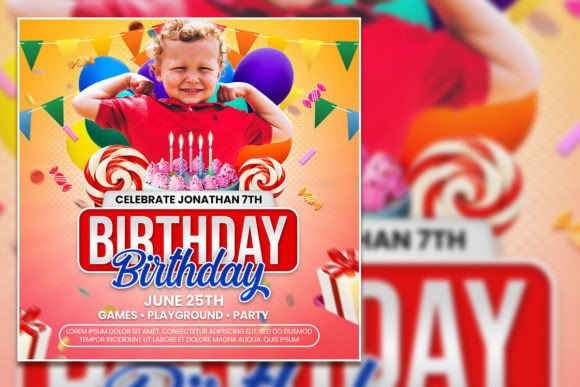
This particular Kids Birthday Party Square Flyer template leverages that format beautifully. The design is clean yet playful, with enough visual interest to capture attention without overwhelming the information hierarchy. Parents who aren't trained designers often struggle with layouts that feel either too cluttered or too sparse. This template strikes that balance, offering a professional foundation that still leaves room for personal expression.
What Makes an Editable PSD Template So Practical
Working with a Photoshop template might sound intimidating if you're not a graphic designer, but the reality is far more accessible than most people assume. The organized layer structure means every element—text, graphics, background colors, and photo placeholders—sits on its own separate layer. Want to swap out the background color to match your party's theme? Simply click the background layer and choose a new shade. Need to change the birthday child's name and age? Select the text with the type tool and replace it with your own wording.
The 300 dpi resolution ensures that what looks crisp on your screen will print with the same clarity. Whether you're producing a single invitation or printing a batch for an entire class, the quality remains consistent. The RGB color mode is optimized for digital displays, so your flyer will look vibrant when shared via email, social media, or messaging apps. For those planning to print professionally, the high resolution provides enough flexibility for most standard print runs without pixelation or quality loss.
One of the most practical aspects is the photo replacement feature. Instead of relying solely on stock imagery or generic clip art, you can insert a photo of the birthday child directly into the design. This single customization transforms a template into something that feels genuinely personal. A smiling face on the invitation creates an immediate emotional connection with recipients and sets a warm, welcoming tone before anyone even reads the party details.
Customization Ideas That Bring Your Vision to Life
The real power of a fully editable flyer template lies in the creative possibilities it unlocks. Here are some practical ways to make this design your own:
- Theme coordination: Adjust the color palette to match your party theme—pastels for a garden party, bold primaries for a superhero celebration, or soft neutrals for a modern minimalist gathering. Changing colors across the template takes just minutes but creates a cohesive look that ties everything together.
- Font personality: If the default typography doesn't match your vision, swap it out. A whimsical script font works beautifully for princess or fairy-tale themes, while a bold sans-serif feels right for sports or adventure parties. Just select the text layer and type your preferred font name.
- Photo placement: Beyond simply inserting a photo, consider how the image interacts with the surrounding design elements. A candid laughing shot feels different from a posed portrait, and both convey distinct moods. Choose an image that captures the energy you want for the event.
- Information hierarchy: Rearrange text elements to emphasize what matters most to your guests. If the location is tricky to find, make the address more prominent. If you're requesting RSVPs by a specific date, give that detail visual weight through size, color, or positioning.
Beyond the Invitation: Other Creative Applications
While this template is designed with birthday celebrations in mind, its versatility extends well beyond party invitations. Small business owners running kids' entertainment services—bouncy castle rentals, face painting companies, children's photography studios—can adapt the template as a marketing asset. Simply replace the party details with business information, swap the photo for a service image, and you have a professional-looking promotional flyer ready for community bulletin boards, social media posts, or local event handouts.
Content creators and bloggers covering parenting, party planning, or lifestyle topics can use the template to create visual content for their platforms. A styled flat-lay photo featuring the printed flyer alongside party supplies makes for an engaging Instagram post or Pinterest pin. The square format is already optimized for these platforms, eliminating the guesswork around cropping and composition.
Event planners and creative entrepreneurs will appreciate the template's adaptability for recurring use. Hosting monthly kids' workshops, seasonal events, or themed celebration packages? The same template can be updated with new details each time, maintaining brand consistency while reducing the time and cost associated with designing fresh materials from scratch. This kind of visual consistency strengthens brand recognition and builds trust with your audience over time.
Practical Tips for a Polished Final Product
Before finalizing your flyer, take a few extra minutes to review it with fresh eyes. Check that all text is free of typos—nothing undermines a professional presentation faster than a misspelled address or wrong phone number. Verify that the date and time are correct, and consider including a rain plan or backup location if your event is outdoors.
Test readability by viewing the flyer at the size it will actually be seen. If you're sharing it primarily on mobile devices, open the file on your phone and make sure the text is legible without zooming. If you're printing it, do a test print on standard paper before committing to a full batch. Colors can appear slightly different on screen versus paper, so this step helps you catch any adjustments needed before you print in quantity.
Consider your audience when making design choices. A flyer for a toddler's party might benefit from brighter colors and simpler language, while an invitation for a tween's celebration could incorporate more sophisticated design elements and casual phrasing. The template provides a flexible foundation, but these subtle adjustments make the difference between a generic invitation and one that feels tailored to your specific celebration.
Finally, save your customized version in multiple formats. Keep the original PSD file for future edits, export a high-quality JPEG or PNG for digital sharing, and save a print-ready version if you plan to produce physical copies. This approach ensures you're prepared for any distribution method without having to revisit the editing process each time.
A well-designed invitation sets expectations and builds anticipation. With this editable birthday flyer template, you have the tools to create something that feels both professional and personal—without spending hours at the computer or hiring a designer. The combination of a thoughtfully structured layout, easy customization options, and high-quality output makes it a practical resource for anyone planning a memorable kids' birthday celebration.