Corporate Social Media Post Design: Your Template Toolkit
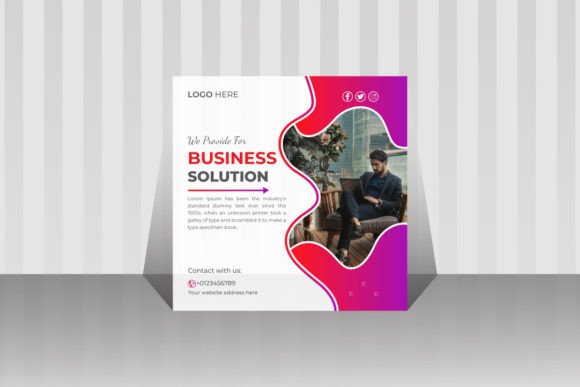
Let's be honest: the pressure to maintain a polished, professional presence on social media is relentless. For a corporate business, every post is a direct reflection of your brand's credibility. You need visuals that communicate trust, authority, and value, but you don't always have the budget or time for a custom design agency. This is where a thoughtfully created Corporate Social Media Post Design template becomes your secret weapon. It’s not about cutting corners; it’s about working smarter to achieve visual consistency and brand recognition across every platform.
This particular template is built for the realities of modern marketing. It’s a Digital Marketing Social Media Post Template Design, meaning it’s crafted with the specific needs of promoting services, sharing insights, and building a professional online community in mind. The download includes 72 dpi RGB Ai & EPS files, which are the standard, editable workhorse files for designers. At 1080x1080 pixels, it’s perfectly sized for the most common social feed formats, ensuring your message looks sharp and intentional. The fact that all main elements are editable and customizable is crucial—it means you’re not just buying a static image, but a flexible framework you can own and adapt.
Beyond the Feed: Where This Template Truly Shines
The immediate use case is obvious: creating sleek social media graphics for LinkedIn, Facebook, or Instagram. But the real value of a well-structured template like this extends far beyond a single post. Think of it as a foundational design asset for your entire brand ecosystem. Because the files are provided in Adobe Illustrator (Ai & EPS) format, you have professional-grade control. You can deconstruct it, repurpose its components, and ensure every touchpoint feels cohesive.
- Brand Identity & Collateral: Use the layout principles and style elements to inform the design of presentations, internal documents, or email newsletter headers. A consistent visual language builds trust.
- Marketing Assets: Adapt the design for digital ads, webinar announcements, or eBook covers. The clean, corporate aesthetic lends credibility to your offers.
- Website & Blog Elements: Extract the style for creating uniform featured images for your blog posts or service page banners. This strengthens your site's visual narrative.
- Print Materials: While designed digitally, the layout can inspire the look of flyers, one-pagers, or trade show materials, ensuring your offline presence matches your online one.
The key is using the template not as a crutch, but as a starting point for a system. The included help guide is a testament to its user-focused design, helping you navigate the customization process even if you're not a seasoned Illustrator pro.
Practical Tips for Making the Template Your Own
Downloading the file is just step one. The real magic happens in the customization. Here’s how to ensure your final designs are effective and authentic to your brand.
Start with Your Brand Palette: The template is in RGB color mode, perfect for screens. Before you even open the file, have your exact brand hex codes ready. Swap out the placeholder colors immediately. This single change will transform the template from a generic tool into something that feels uniquely yours. Consistency in color is one of the fastest ways to boost brand recognition.
Typography is Your Voice: The template uses a free font, which is great for accessibility. However, you must pair it with your brand's established typefaces. This is where understanding font pairing comes in. If your brand uses a strong sans-serif for headlines (like Montserrat or Helvetica), ensure you use that here for titles. Use the template’s body font or your own complementary serif or sans-serif for supporting text. The goal is readability and harmony, not a jarring mix. Test your text at the actual pixel size to ensure it’s legible on a mobile phone screen.
Edit the Structure, Not Just the Surface: Don’t just change the text and colors. Look at the hierarchy. Does the layout guide the eye the way you need it to? You might need to adjust the size of a headline, the placement of a logo, or the weight of a divider line to better suit your message. The editable layers in the Ai file are your playground for this. A strong visual hierarchy ensures your key message isn’t lost.
Commercial Awareness: Always double-check the licensing of any fonts or additional assets you bring into the design. The template itself is designed for commercial use, but if you integrate a third-party premium font, you must ensure its license covers your intended use, whether for social media, merchandise, or digital products.
A System, Not Just a Single Post
Ultimately, a resource like this Corporate Social Media Post Design template is most powerful when viewed as part of a larger system. It’s a tool for maintaining visual consistency, which is the bedrock of professional presentation and audience engagement. Instead of starting from zero each time, you start from a place of strength, with a layout that’s already optimized for clarity and impact. This frees up your mental energy to focus on what truly matters: crafting a compelling message, sharing valuable insights, and building genuine connections with your audience. It’s about working efficiently to maintain the high standard your corporate brand demands in the fast-paced digital landscape.